
CougarLife’s published Credit rules make the cost of starting a conversation clearer than a generic “price per message” claim. For members who use Credits, its FAQ lists 5 Credits to start a standard message to a female member, 10 Credits to start a Priority Message, and 5 Credits to open a Collect Message.
Further messages to the same member are free after contact has been initiated. The cash cost still depends on the package and extras shown at your checkout.
Research method (November 1, 2026): We reviewed CougarLife’s published official FAQ and terms, then calculated the example Credit budgets below from the published action costs. We did not buy a package, test a paid account, or verify local member activity. Examples are arithmetic, not observed results or guaranteed prices. Read more about how Cougar Dating Guide reviews dating sites.
Eligibility and location: CougarLife’s terms say the service is for adults and is currently intended for users in Canada and the United States. Readers elsewhere should confirm eligibility and applicable terms before planning a purchase.
What does CougarLife charge Credits for?
The published rates describe initiating contact with a female member, not every possible conversation between every account type. The FAQ gives these rates for the Credit-based system:
| Action | Published Credit cost | What the charge does |
|---|---|---|
| First standard message to a female member | 5 Credits | Starts contact without Priority placement |
| First Priority Message to a female member | 10 Credits | Starts contact with the message highlighted near the top of the recipient’s inbox |
| Open a Collect Message | 5 Credits | Opens an incoming message sent as Collect |
| Further messages to the same member after contact starts | Free under the FAQ’s stated rule | Does not create another first-contact charge merely because the exchange continues |
Do not read “10 Credits for Priority” as 10 Credits on top of the 5-Credit first message: the FAQ presents it as the rate to initiate with a Priority Message. Other optional products, account types, and checkout offers need their own review. Source: CougarLife FAQ.
A Credit budget for three different plans
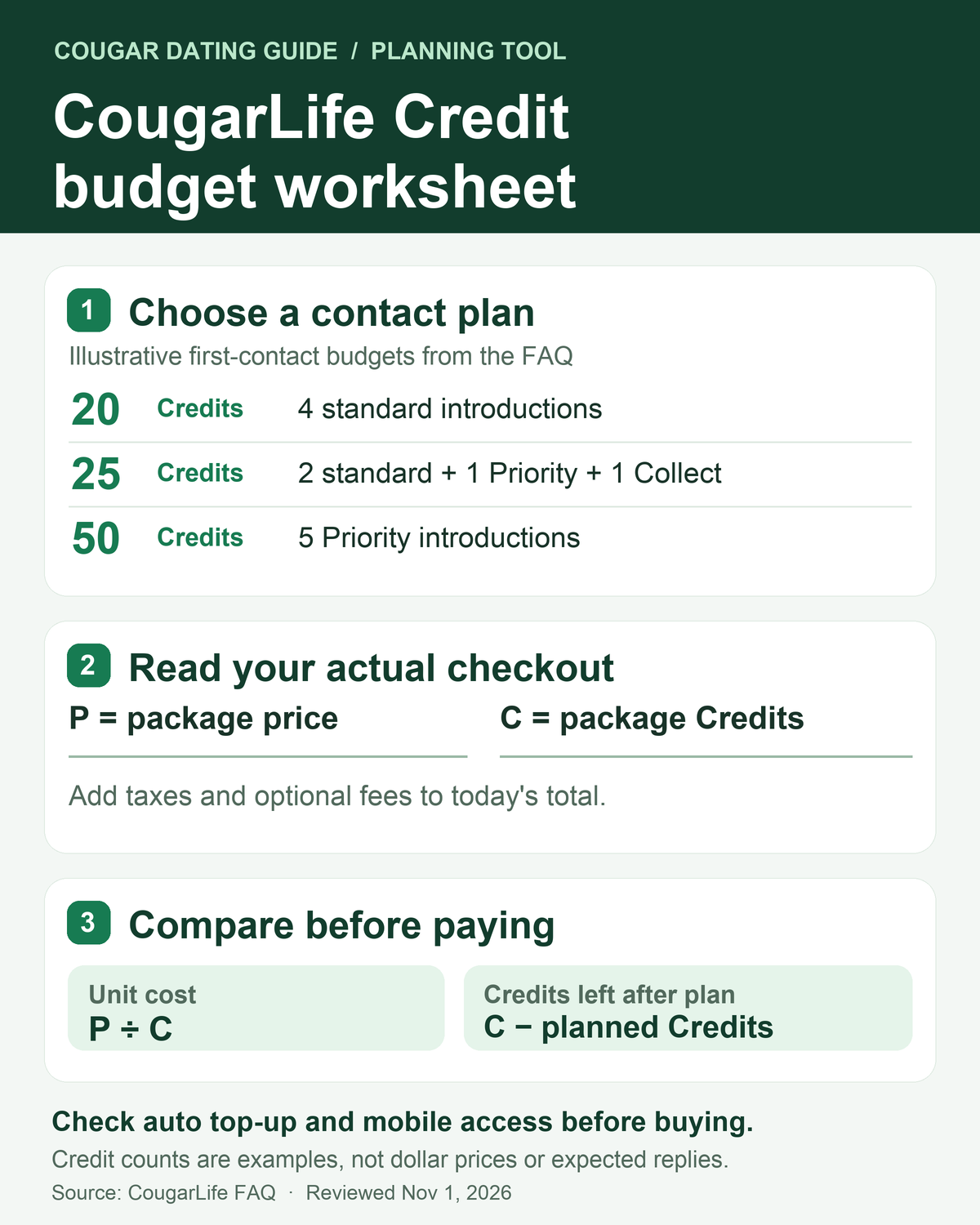
The useful planning unit is the number of new contacts, plus any Collect Messages you choose to open. Here are three hypothetical plans using only the three published action costs above:
| Plan | Calculation | Credits to reserve |
|---|---|---|
| Try four standard introductions | 4 × 5 | 20 |
| Try two standard introductions, one Priority introduction, and open one Collect Message | (2 × 5) + 10 + 5 | 25 |
| Try five Priority introductions | 5 × 10 | 50 |
These totals do not estimate replies, dates, or your chance of meeting someone. They also exclude purchases outside the listed actions, taxes, and any mobile-access or subscription charge. A package larger than your plan can lower the displayed price per Credit while still raising the amount you pay upfront. That is why “cheapest Credit” and “lowest-risk first purchase” are different decisions.
How to turn Credits into a real dollar budget
CougarLife’s public FAQ lists Credit packages but does not provide one universal cash price for every account and purchase channel. At your own checkout, write down the package price P, the number of Credits C, and every additional line item.
The package’s nominal cost per Credit is P ÷ C; a 5-Credit first message uses 5 × P ÷ C of that prepaid balance, before extras. This is a way to compare offers, not a claim that you can buy exactly five Credits or that the unused balance is refundable.
For example, if your plan needs 25 Credits, compare the smallest available package that covers 25 with any larger package. For each offer, write down Credits left after your plan = package Credits − 25 alongside the total amount due today.
A lower unit price does not save money on a first purchase if you pay more upfront for Credits you do not expect to use. Do not count on a refund for leftover Credits; the terms limit refunds to specific circumstances.
If the checkout shows a different action rate from the public FAQ, use the live checkout for your decision and consider asking CougarLife support to clarify it before paying.
Three CougarLife Charges and Settings to Check Before Paying
1. Automatic Credit top-up
CougarLife’s terms say Credit purchases are excluded from ordinary subscription renewal unless you expressly opt in. Its FAQ says that, when automatic top-up is enabled, the site can replenish Credits using the last package bought as the balance runs low.
The desktop path to disable it is Settings → Account → Purchases → Disable top-up. Paid subscriptions are a separate renewal decision. Check the top-up setting and final purchase summary before paying, then confirm the setting after purchase if you do not want replenishment. FAQ · Terms.
2. Mobile access fee
The FAQ calls the mobile access fee optional for Credit-based users who do not want mobile access. It says you can remove it on the desktop-web Buy Credits page by using the Mobile Access banner beneath “Select a Package.” It also says the fee cannot be opted out of during an iOS/Android app or mobile-web purchase.
If you intend to use desktop only, compare the desktop checkout subtotal before purchasing; if you want mobile access, budget for the fee actually shown. Source: CougarLife FAQ.
3. Priority Man subscription versus Priority Message
A Priority Message is a 10-Credit first-contact action in the FAQ. Priority Man is a separate profile-visibility product; CougarLife’s FAQ describes its cancellation through the Purchases page. Do not assume one purchase includes the other. Read each line of the checkout and any renewal date before accepting an offer. Source: CougarLife FAQ.
Who may not need to buy Credits?
According to CougarLife’s FAQ, women seeking men receive Full Membership free. Men seeking women, men seeking men, and women seeking women can join as Guests to view profiles, share photos, and send Winks, but need to buy a Credit package for the stated Full Membership features. The free option therefore depends on the account category and what the member wants to do; “CougarLife is free” is too broad a conclusion. Source: CougarLife FAQ.
How to Decide Whether to Buy CougarLife Credits
We would start with the free access available to the account, look for relevant nearby profiles, and set a small number of introductions that we can afford without needing a response. We would then calculate the Credits for that plan, compare the actual total checkout amount, check mobile access and top-up settings, and leave the larger package alone unless there is a specific reason to expect using its balance.
This is a spending-control framework, not a tested claim about the site’s match quality.
For a broader judgment about whether the niche, privacy controls, and member pool fit your goal, read our CougarLife review. If the Credit model itself is the problem, our comparison of three different alternatives explains how their communication models differ.
Frequently asked questions
Does CougarLife charge for every reply?
Its FAQ says additional messages to the same member are free after contact has been initiated under the published Credit rule. Charges for other actions are separate.
How many Credits do I need for ten first messages?
If all ten are standard first messages to female members under the stated rule, the arithmetic is 10 × 5 = 50 Credits. Ten Priority first messages would require 10 × 10 = 100 Credits. These are Credit totals, not cash prices or a promise of replies.
Can I stop automatic top-up?
Yes, the official FAQ provides a desktop setting under Settings → Account → Purchases → Disable top-up. Check that the setting remains off after a purchase if you do not want replenishment.
Are unused Credits refundable?
Do not assume so. For direct purchases, CougarLife’s terms describe a 14-day cancellation period and a prorated refund based on Credits used, provided the cancellation notice is received in time; using all Credits from that purchase ends that right under the stated policy.
A longer period may apply under local law. The terms also say that, if you subscribe through Apple or another authorized platform, that platform’s rules govern the order, including cancellation. Unused Credits can expire without a refund after full account deletion except as the terms provide.
Check the current terms for your location and purchase channel before paying or deleting an account.